A recorded inventory review can show several modifier systems at once. The useful habit is to identify the panel, tag, resource condition, and game version before copying a number into a build note. This page follows a Bilibili clip recorded after a long fishing run; it documents visible tooltips rather than claiming a controlled test.
Video source:明天还有奶茶喝嘛 — 关于我钓了2个小时鱼这件事 (published October 10, 2026; reviewed October 11). The clip has Chinese interface text and on-screen captions; the article crops remove the channel mark and captions. The screenshots preserve the game UI, and the English explanations below are descriptive translations rather than official localization.
Read item-set modifiers from a recorded run
Use four timestamped inventory checks to separate a character stat panel, an attribute gem, a set effect, and a Hatchmon set effect.
1. Start with the character stat panel
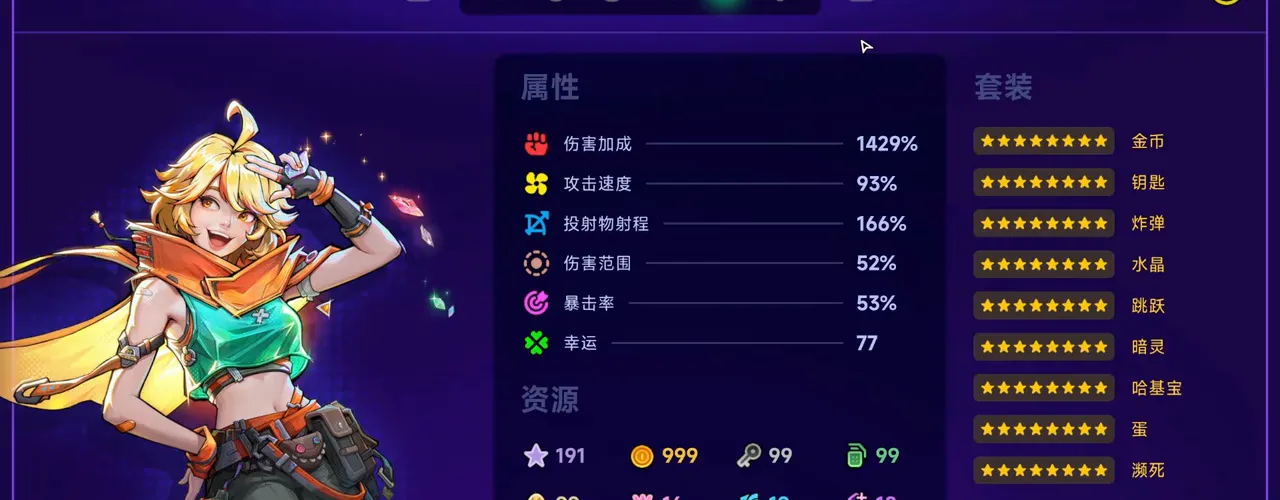
The recording first opens the Attributes tab after a long fishing run. Treat the displayed damage, attack speed, range, and luck values as this loadout snapshot; they are not base stats for every character or weapon.
At 01:26, the Attributes panel records the run’s current stat totals and nine visible set rows. Watch this frame at 1:26
2. Separate an attribute gem from a set effect
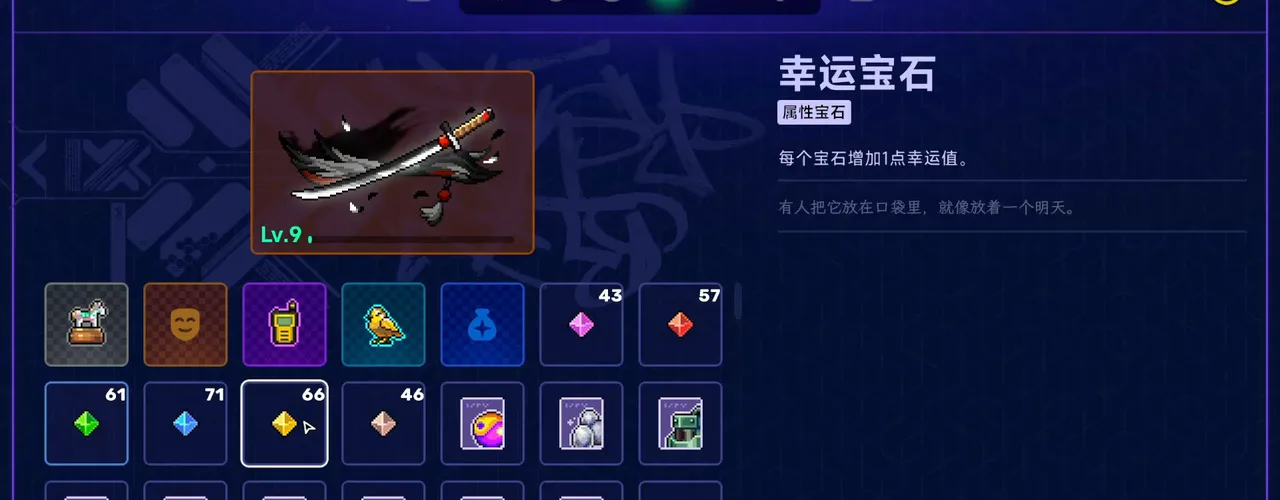
The lucky-gem tooltip says that each gem adds one luck point. It is an attribute gem, so its text explains a direct stat contribution; do not read it as the effect of the entire key, egg, or wisps set.
At 01:30, 幸運宝石 (lucky gem) is selected and its one-point luck contribution is visible. Watch this frame at 1:30
3. Read the resource condition in a set effect
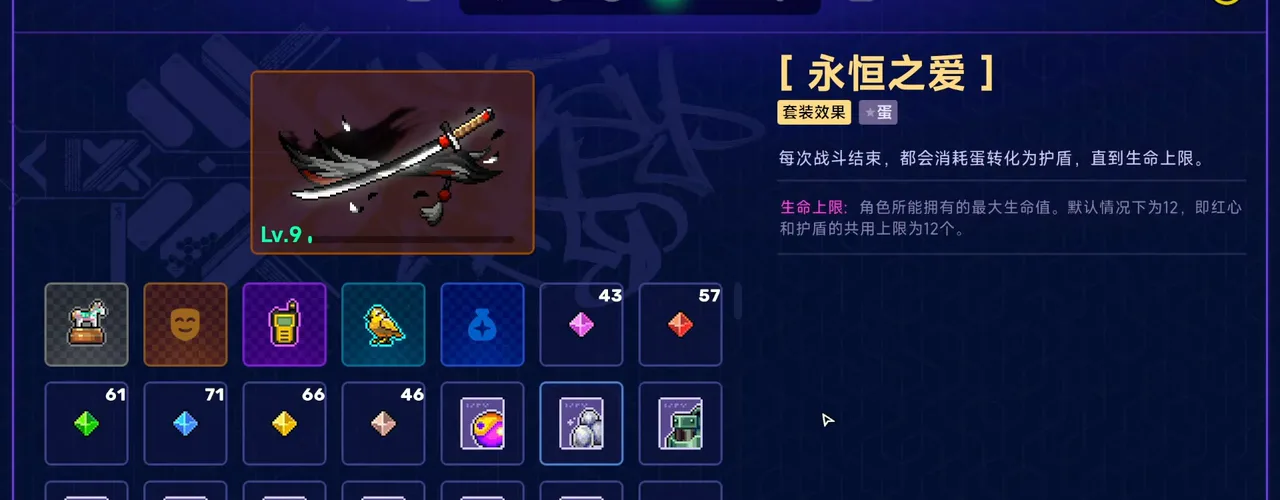
The 永恒之爱 set is tagged with eggs and says that each battle converts eggs into shields up to the health limit. This is a resource-to-defense rule observed in the clip, so record the current version and egg count before treating it as a repeatable build plan.
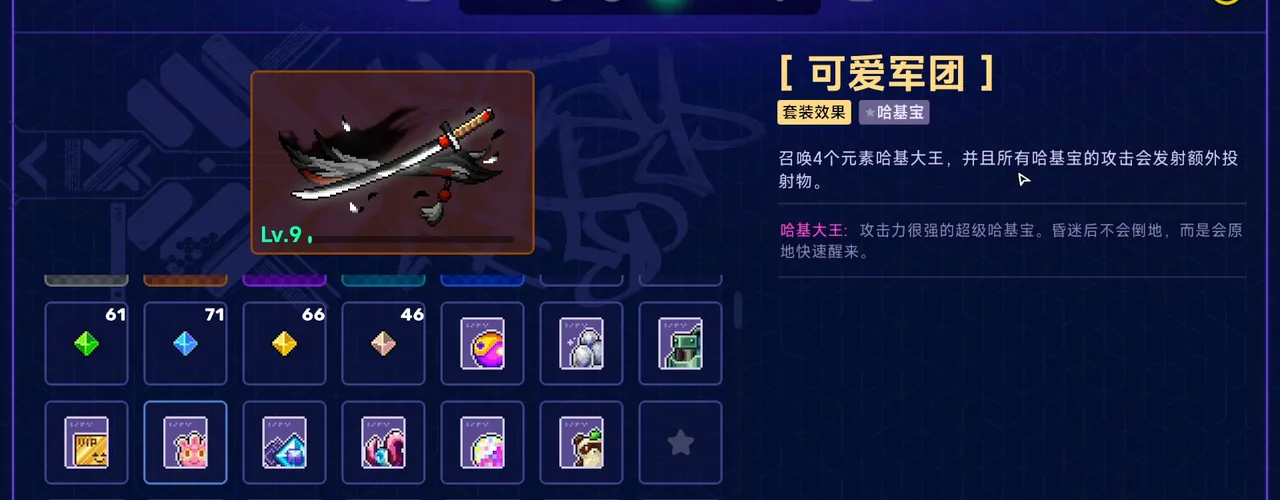
The 可爱军团 tooltip is tagged 哈基宝 (Hatchmon) and describes four elemental Hatchmon leaders that add projectiles. Keep this category separate from weapon damage and from the egg set; the same run can show all three effects at once.
At 01:42, the Hatchmon-tagged 可爱军团 tooltip describes four elemental leaders and extra shots. Watch this frame at 1:42
The same run can display high totals because it has accumulated resources and set rows. Compare the item-set guide when you need the nine visible categories, then use the weapon database for source-linked weapon effects.
How should you record a modifier?
Write down the exact tooltip title, its tag, the resource it consumes or creates, and the timestamp. The lucky gem is a direct luck contribution; 永恒之爱 converts eggs into shields; 可爱军团 adds projectiles through Hatchmon leaders. These are different mechanic shapes even though they appear beside the same level-9 weapon.
What this clip does not prove
The video does not isolate damage, compare alternate runs, or establish drop rates. It also uses a Chinese interface and an early-access-era recording. Treat the four tooltips as a reading reference and recheck the current PC 1.0 text before publishing a build recommendation. The weapon upgrades guide explains why one displayed level and modifier total should not be copied as a base value.
Source: Bilibili video BV12Dpj6QEfL, reviewed October 11, 2026. Timestamp links point to the source video; all four screenshots are cropped gameplay frames from the same inventory sequence.